
Tech
Gear Eye Review: The Ultimate Gear Tracking Solution?

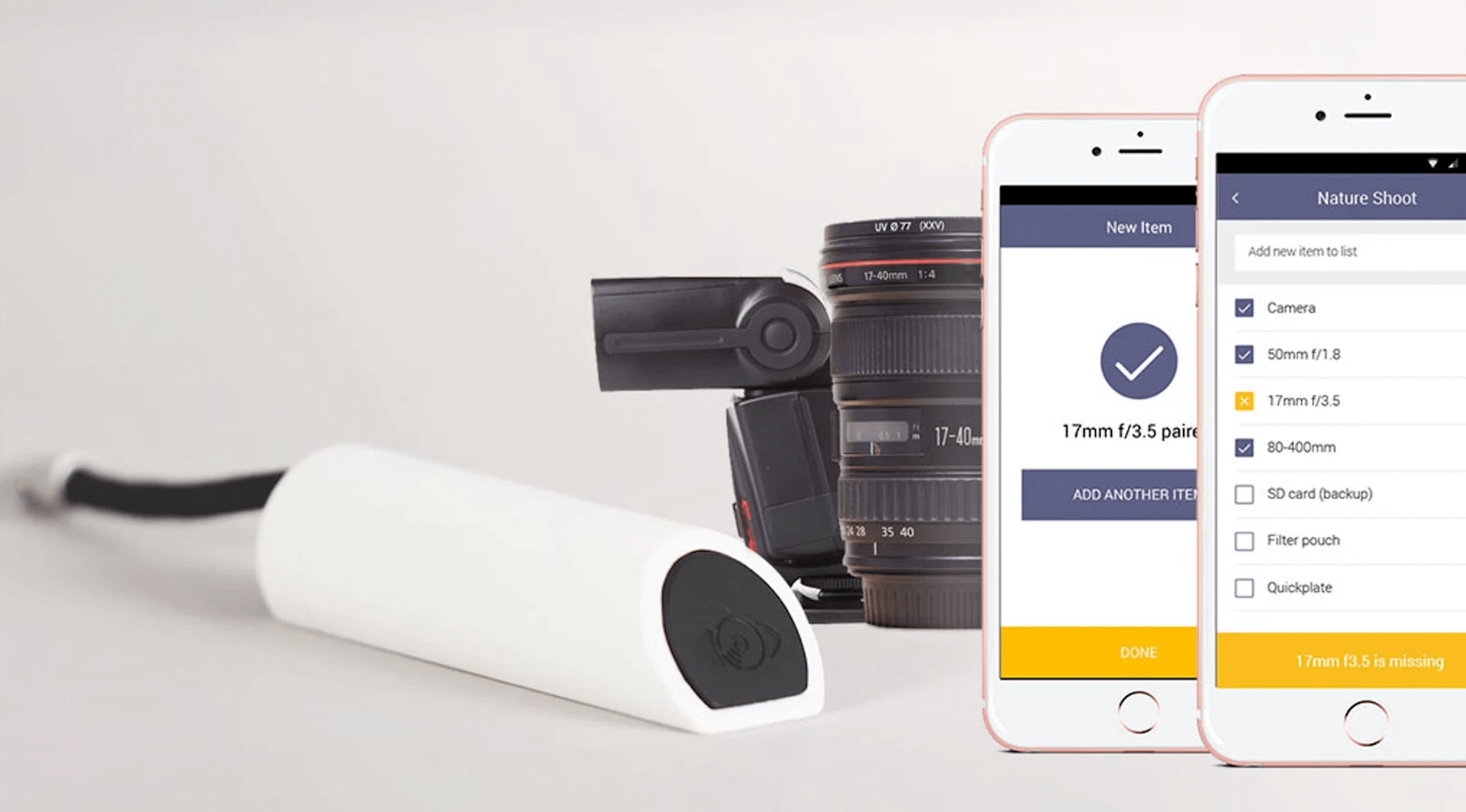
Have you heard about the gear tracking solution, Gear Eye?
It was initially introduced into the market as a crowdfunding campaign in 2015 or so. And now, that product has finally officially been released!
For today’s GearEye review, we’re going to take a closer look at what this product can do for you! We hope that, by the end, we would have helped you determine whether Gear Eye is something that you want to buy into or something that you want to pass on:
Never Lose a Piece of Gear Again

Gear Tracking from Jeff Hopper
GearEye’s tagline is ‘Never Lose a Piece of Gear Again!’
Back when it had just been a crowdfunding campaign, many of those whose professional career required them to travel with valuable equipment backed the product’s launch.
And why wouldn’t they? Who wants to have to continue replacing equipment that they need for work — important equipment that, more likely than not, are incredibly expensive to replace?
In any case, GearEye offered itself up as a solution for this issue. But, what have they done to actually accomplish this? That’s what we’ll be talking about next:
The Creation of The Ultimate Smart Gear Management System!
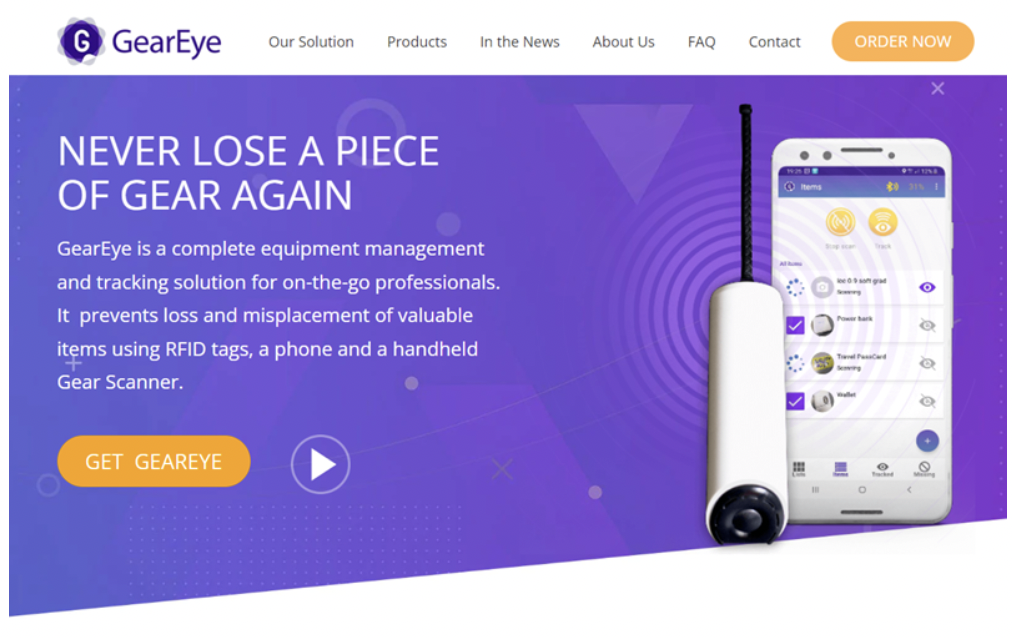
Gear Management System – GearEye!
According to the CEO of Gear Eye, Julia Lerner, GearEye went through several stages. This is probably most evident to the original backers of the GearEye crowdfunding campaigns, who might remember that there had been initial plans for a smartphone case that would work similarly to the GearEye dongle that they eventually ended up choosing not to create.
But, based on an interview that Julia Lerner had released regarding GearEye’s manufacturing process, there were many other details that they had to consider carefully to truly make GearEye the ultimate gear tracking solution that it is today. These include:
The GearEye Dongle
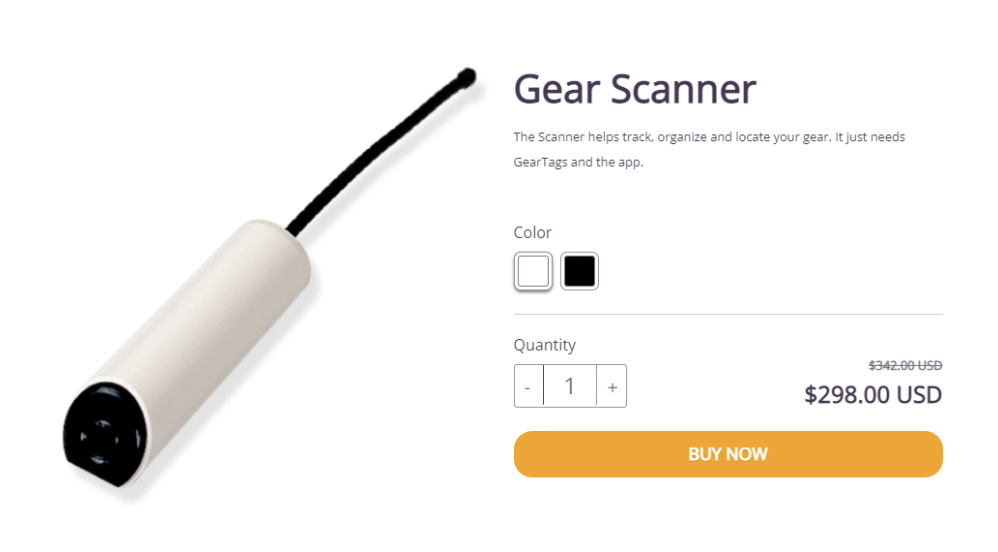
GearEye Dongle / Scanner!
The GearEye Dongle is the compact RFID scanner that is included with the GearEye kit (although you can also purchase it separately!)
This device was made to fit comfortably in the palm of your hand and wouldn’t be bothersome to bring along even if you’re only carrying the smallest messenger bag that you have.
Just to make it perfectly clear, the dongle serves as the focal point for all your equipment. This is what you will need to use in order to search for missing items later — it will work in conjunction with the app to determine how close or how far you are to a given item!
How Does GearEye Keep Track of All Your Equipment?
GearEye tracks items with RFID (Radio Frequency Identification) technology.
If you want specific details, according to the GearEye FAQs page, they use different types based on your specific country’s regulations. These types are EPC Gen 2 and UHF 860-950 MHz band (ISO 18000-6C).

How to Use the GearEye Dongle?
The GearEye dongle shines the most when you’re tracking equipment under the “Locate” mode. As you can guess from the name, this is the mode that will allow you to track lost work equipment — with the dongle fully making use of RFID technology to look for the items that you’ve tagged with GearEye’s affordable RFID GearTags.
The GearEye RFID Tags
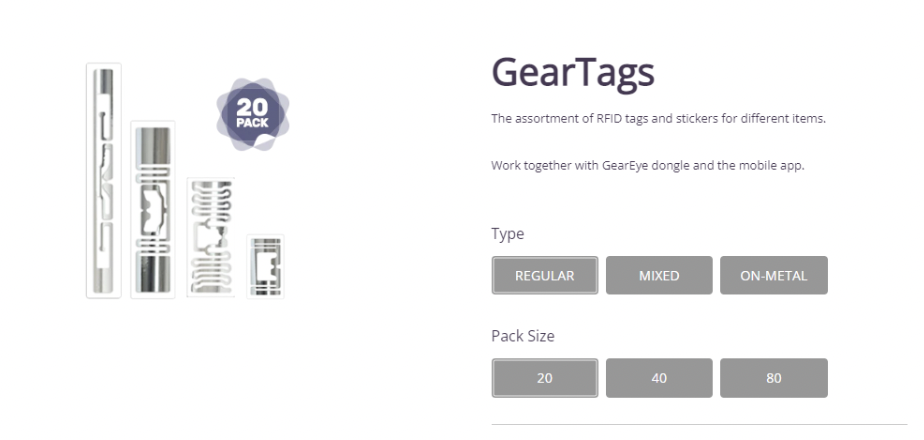
GearEye – RFID Tags!
Next, let’s talk about the RFID tags that act as tracking devices for all of your essential gear. These RFID tags are perhaps better described as RFID stickers — they are thin and are easily attached to all of your expensive equipment.
Each of these tags comes equipped with RFID technology and will serve as the focal point for the dongle to start working — allowing you to easily track these individual items without worry!
How to Use the GearTags?
This part is fairly straightforward! As a ‘sticker’, all you need to do to use these GearTags is to remove the protective film away from the tag in order to stick it onto the surface of your gear.
Each tag was created with the highest quality adhesive. GearEye has made sure to consider the type of material that your gear may come in as well. This is why they created both regular tags that come with a powerful adhesive that works with most materials (i.e., not on metal items) and metal tags that were created to stick to metal items!
GearEye also offers their tags in several sizes so that you won’t have to worry about using awkwardly large or small stickers on your gear!
Why RFID Tags and Not Bluetooth Tags?
According to the CEO of GearEye, Julia Lerner, they decided to choose RFID stickers over the more commonly used BLE Tags (Bluetooth Tags) that most other trackers use because of several reasons:
- RFID tags have a small and slim profile — which is easier to attach to smaller items.
- RFID technology is also more accurate in comparison, allowing you to pinpoint the location of an item without trouble.
- GearEye’s tags are also RFID UHF stickers, which mean that they are battery-free and will last forever — requiring no replacement.
- The previous fact and the fact that RFID tags are also far cheaper — with the price difference being anywhere from $0.10 for each RFID sticker and $20-30 each for BLE tags — were also carefully taken into account.
In conclusion, the reason why GearEye chose RFID over BLE tags is that they are low cost (per item), have lasting power, and are generally just more convenient — allowing you to keep a truly impressive number of gear safe without worry.
The GearEye App!
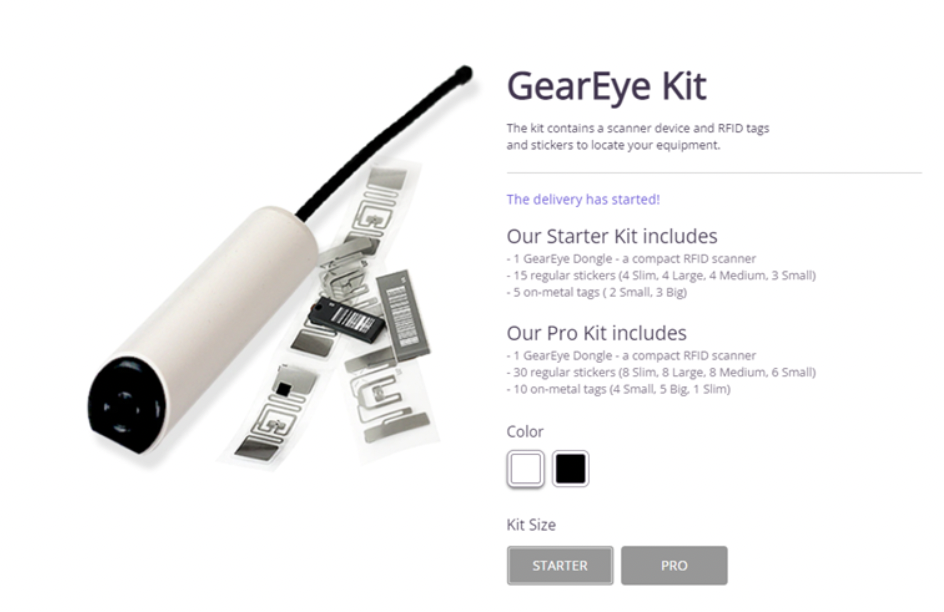
GearEye – Starter & Pro Kit!
The last aspect that we have to talk about is the GearEye app. This is the brain of the entire operation, making it, truly, the perfect solution for on-the-go professionals that are constantly losing gear!
As an important note: this app will work on both IOS and Android devices, so that’s not something that you have to worry about!
How Does the GearEye App Work?
We discussed this somewhat earlier when we were describing the “Locate” mode while we were talking about the dongle, but that’s actually just the beginning of what this app is capable of!
To be perfectly clear, there are three modes that you can use:
Scan Mode
In scan mode, keeping track of the gear that you’ve brought for today’s studio session or are preparing for next week’s beach shoot has never been easier!
It takes only a simple tap for you to scan for all the equipment that you need for a given gig. GearEye will scan the surrounding area for all your items and mark the ones that are not around with an “X” (of course, to make this easier, you also have the option of making customized lists with gig-specific groups of gear required for certain jobs!)
Track Mode
Track mode is perfect for a serial entrepreneur that is literally always on the move. All you have to do is give GearEye permission to run in the background to make this mode work!
After which, it will begin to automatically track your gear — and, on the occasion where you leave something behind, the app will notify you of it immediately, allowing you to begin your search for the item before you can get too far.
Locate Mode
We’ve already mentioned this earlier, so we’ll spare you the details. But, with this mode, you can make use of your phone’s smart sensors (which will enhance GearEye’s scanning accuracy) in order to locate lost items!
The Best Complete Gear Management Solution? | Not Just a Safety Net!
So, what do you think? We personally expressed a lot of positive remarks in this article and we do seriously consider GearEye to be quite the game-changer, but your opinion on this product is entirely up to you!
All we can say is that we like the fact that it is a low-cost solution (with the retail price for the kit with several tags included much lower than most competitors.) We also like the fact that GearEye seems to have carefully considered many of the aspects during the entirety of their product development process. And, finally, we believe that, no matter what kind of work you do, you may be able to find use for it in the end!

Byline: Mae Cornes
MADISON, Wis— Evo Tech announced new updates to its flagship platform, Evolution AI, designed to enhance threat detection and real-time data analysis for intelligence, security, and law enforcement agencies. The upgraded system introduces expanded capabilities in pattern recognition, automated alerts, and data aggregation to improve response accuracy in critical operations.
The company’s latest release focuses on enabling faster identification of potential threats across multiple data streams, including text, imagery, and audio inputs. By combining adaptive machine learning models with advanced verification tools, Evolution AI now provides a more precise and scalable method for detecting irregular or suspicious activity.
“Security challenges are growing more complex as data sources multiply,” said Maria Pulera, Evo Tech’s representative. “Our goal with these new features is to help agencies detect threats earlier and reduce the time between data discovery and action. These tools are built to support real-world decision-making in fast-moving environments.”
Among the new enhancements are:
- Automated Threat Classification: The platform can now categorize potential risks based on severity and relevance, allowing analysts to prioritize investigations more effectively.
- Cross-Platform Data Fusion: Evolution AI aggregates data from both structured and unstructured sources, presenting analysts with unified, real-time insights across visual, audio, and textual inputs.
- Adaptive Anomaly Detection: Using machine learning, the platform learns from historical data to recognize unusual activity patterns and flag potential security concerns automatically.
- Enhanced Visualization Tools: New dashboard designs allow users to view correlations, track trends, and monitor data sources simultaneously with improved clarity.
Evo Tech’s development team designed these upgrades to help intelligence and defense organizations address increasing information volume and data fragmentation. According to industry reports, global data generation is expected to exceed 175 zettabytes annually by 2026, underscoring the need for advanced analytical tools that can handle large-scale, multi-format data securely.
Pulera added, “Our technology aims to reduce the manual burden on analysts while maintaining the highest standards of data integrity. We’ve focused on features that allow agencies to operate more efficiently without compromising security.”
The company’s engineering team also confirmed that Evolution AI’s infrastructure supports deployment in secure, private networks, aligning with the data protection requirements of defense and intelligence clients. Evo Tech plans to continue rolling out additional modules throughout 2025, with a focus on multilingual data analysis and predictive threat modeling.
Evo Tech’s latest updates come as governments and private institutions invest heavily in AI-driven security technologies. Market forecasts from MarketsandMarkets estimate that AI in defense and security applications will surpass $13 billion by 2028, reflecting a growing global emphasis on automation and early threat detection.
About Evo Tech
Evo Tech is an artificial intelligence company specializing in data analysis and intelligence automation for security and defense operations. Its flagship platform, Evolution AI, integrates machine learning, big data processing, and adaptive analytics to enhance decision-making in high-volume, high-security environments. The company’s mission is to deliver reliable, real-time solutions that strengthen operational efficiency and intelligence accuracy across the public and private sectors.
Contact Information:
Maria Pulera, Representative
EVO Tech
https://evoai.tech/
-
 Tech5 years ago
Effuel Reviews (2021) – Effuel ECO OBD2 Saves Fuel, and Reduce Gas Cost? Effuel Customer Reviews
-
 Tech7 years ago
Bosch Power Tools India Launches ‘Cordless Matlab Bosch’ Campaign to Demonstrate the Power of Cordless
-

 Lifestyle7 years ago
Catholic Cases App brings Church’s Moral Teachings to Androids and iPhones
-

 Lifestyle5 years ago
East Side Hype x Billionaire Boys Club. Hottest New Streetwear Releases in Utah.
-

 Tech8 years ago
Cloud Buyers & Investors to Profit in the Future
-

 Lifestyle6 years ago
The Midas of Cosmetic Dermatology: Dr. Simon Ourian
-

 Health7 years ago
CBDistillery Review: Is it a scam?
-

 Entertainment7 years ago
Avengers Endgame now Available on 123Movies for Download & Streaming for Free